
Due to technological progress, it is now straightforward to check SASSA SRD Status online using the Moya mobile application. Applicants can access the app and check their application status anywhere, anytime, even without an internet connection.
In this guide, understand the SASSA status, its importance, a guide to check status on the Moya App, and how to apply for SASSA grants online. So, keep reading the post!
Understanding the SASSA Status Check?
Citizens apply for SASSA grants, such as the SRD R350 grant, older persons’ grant, child support grant, or disability grant, and need to check their application status. This status is referred to as declined, approved, not approved, or pending.
Today’s technological changes have made it easy via the Moya app, SMS, or online on the web portals in a secure manner. Moreover, clients remain updated about the latest notifications and news on real-time basis.
Why is the SASSA Status Check Important?
To proceed further to accessing SASSA grants, checking the status is important. If the application is declined, approved, not approved, or pending, users will know what to do next.
Additionally, users remain updated about changes and deadlines on time to avoid delays. Beneficiaries plan according to those updates and also prevent errors in all proceedings related to declined or not approved applications.
Check SASSA Status Using the Moya App in 2025
Follow the straightforward guide given below to check statuses on the app:
Step 1: Check Compatibility
- Android devices are compatible with version 5.0 and above, IOS users with version 11. Ensure the compatibility requirement before downloading or installing the app.
Step 2: Download the Moya App
- Android users can download the Moya App directly from the Google Play Store, and iOS device users can also download and install the app from the Apple App Store.
Step 3: Open the Moya App
- After installing the app, navigate to the home screen of your device, locate the app icon, and click on it.
Step 4: Navigate to the Discover Tab
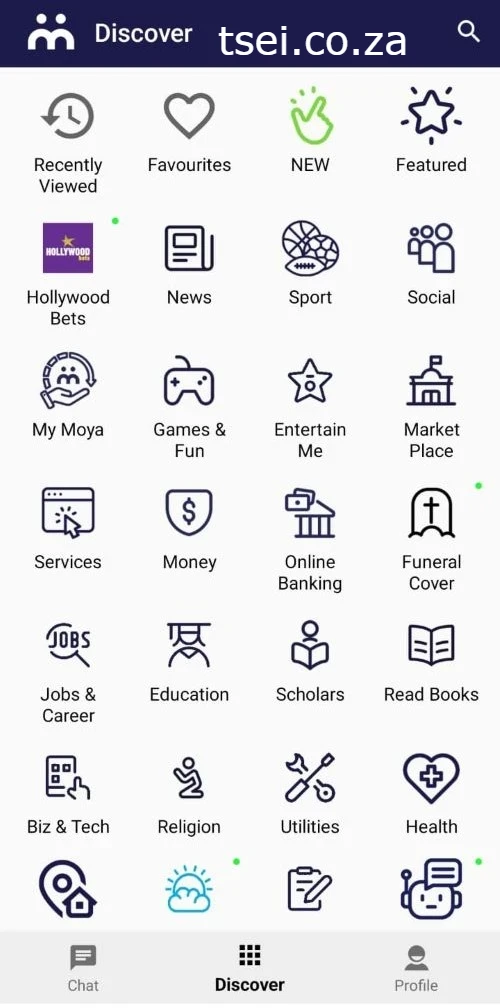
- Navigate to the “Discover” section to proceed further. You will get a menu section.
Step 5: Locate the SRD Option
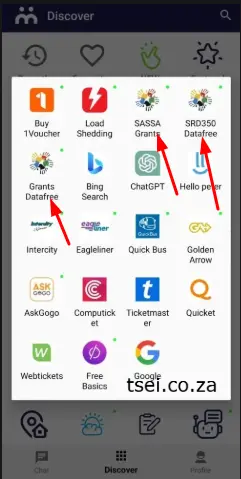
- Look for SRD (Social Relief of Distress) to check SRD R350 grant status.
Step 6: Access the Secure Status Check Window
- When you click on the SRD button, you have to enter the required information.
Step 7: Enter Your Information
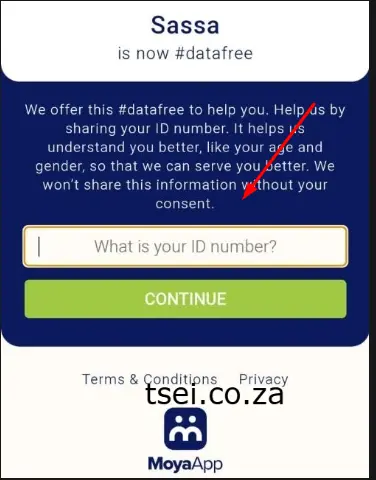
- Enter your valid information, like your South African ID number and your mobile phone number, correctly.
Step 8: View Your SASSA Application Status
- After providing information, click on “Check Status”. Here you can check whether your application is approved, pending, declined, or failed.
Note: This App has a unique feature to check status online with no internet connection. You can access the app with a zero-rated internet connection.
Check SASSA Status Balance on the Moya App
You can use the Moya App for SASSA balance status online as well:
- Download and install the Moya App on your smartphone.
- In the “Discover” menu, click the “SRD” option.
- Now, click on the “SASSA Grant Balance”.
- Provide your Grant Application ID.
Now you can check the SASSA balance status.
Understanding Your SASSA Status
Here are the following aspects that you will get different scenarios like:
- Pending: This means your application is under review and still being checked by the administration. No actions need to be performed; just wait.
- Approved: An approved application means you have to receive payments by SASSA Grants, and check the deadlines and dates to receive payments.
- Not-Approved/Declined: This status referred to occurring errors, invalid information, incorrect data, age restrictions, or a mobile number. As a result, the application is rejected.
- Failed: This means your application is submitted incorrectly. Apply for resubmission of the application and try again.
Apply for SASSA SRD Grant Using the Moya App
The Moya App provides an advantage to clients to apply for the SASSA SRD Grant online on the app as well. Here is a step-by-step guide:
- Download and launch the Moya App on your device.
- In the “Discover” menu, click on the “SRD” option.
- On the new window, you will go to a secure webpage to enter your personal information to complete the application form.
- Fill out the form with information like name, surname, address, date of birth, employment status, South African ID number, bank account details, and permit number.
- After entering all information correctly, click on the “Submit” button.
You will receive a confirmation notification for your submitted application.
Tips for a Successful SASSA Status Check
- Always access a valid portal and secure platforms to check a verified status.
- Enter all information correctly with valid data.
- Re-check the entered information if an error occurs.
- Save your ID number and credentials handy.
Keep updated and followdeadlines for the related process.
Conclusion
SASSA SRD status check for grants is important for applicants to know about their application approval, non-approval, and failed results. The Moya Mobile APP is available for IOS and Android users to access the portal and SRD section online. Enter your South African ID Number and registered mobile number to check application status effortlessly.
Pingback: SASSA Status Check Appeal
Pingback: SASSA SRD R370 Grant Application is Disapproved | How to Appeal?
Pingback: SASSA SRD R370 Grant | How to Apply for SC19 Application Process
I want R370 realive distressed
SRD CHECK STATUS
Check your SRD Status. visit: https://tirc.xyz/sassa-status-check-appeal/
I want to use this spp
download Moya APP for SRD grant and follow all these steps
Hello.. Please I need help with my 370 I have two months declined. Help
you should need to check why your srd R370 is decline
My 350 jest spotted
Pingback: Sassa Status Check - SRD R350 Grant Payments Updated 2025